
200KB PDF Compressor, Merger and Document Resizer
The Only PDF Tool You'll Ever Need
The most reliable 200kb pdf converter for official portals. Merge PDF, combine documents, and compress to 200kb without losing text clarity.
Drag & Drop Files here
Combine, rearrange, and super-compress your PDFs and Images locally. Your files never leave your device.
Private & Offline-First
Target Size Logic
Hybrid PDF Merger
The Only PDF Tool You'll Ever Need
Stop jumping between 10 different websites. pdfriend.in brings industrial-grade PDF merging, smart compression, metadata scrubbing, and document security into a single, private workspace.
Why use this tool?
Our engine uses smart hybrid compression to keep text crystal clear while shrinking images to meet your target KB limit. Everything happens locally in your browser memory—nothing is uploaded to any server.
We built this because we hate "free" tools that steal your data. When you unlock a PDF or redact sensitive info on pdfriend.in, it happens on your hardware. Zero uploads. Zero tracking. Total control.
When to use 200KB limit?
- • Compress PDF to 200kb for job applications or portal uploads.
- • Merge multiple documents into one single file.
- • Add watermarks to brand your work.
- • Add page numbers for professional reports.
- • Delete unwanted pages with a single click.
- • Protect PDF with password encryption or remove passwords.
- • Redact sensitive ID numbers and remove PDF metadata.
Quick Start Guide
Drop your files
Upload PDFs, JPGs, or PNGs. Everything is processed in your browser memory—nothing is uploaded to any server.
Apply Enhancements
Use the sidebar to add a watermark, toggle page numbers, or scrub metadata. Only pick what you need.
Edit & Clean
Click a page to rotate it, redact sensitive info, or crop out messy margins. Drag to reorder or click delete to remove pages.
Lock & Shrink
Set a password if needed and pick your target size (e.g., 100KB or 2MB). Our engine handles the rest.
Save Locally
Hit Generate and Download. Your new, optimized file is ready instantly.
Mastering PDF Compression: A Deep Dive into Privacy and Precision
In an era where every government portal, university admission form, and job application requires a specific file size—usually the elusive 200KB PDF—the frustration of "file too large" is a universal experience. However, the real danger isn't the file size; it's the tools we use to fix it. Most "free" online PDF compressors are data traps. They require you to upload your most sensitive documents—Aadhaar cards, PAN cards, bank statements, and academic transcripts—to a remote server. You have no idea where that server is, who has access to it, or if your data is being used to train AI models or sold to third-party data brokers.
At pdfriend.in, we decided that "free" shouldn't come at the cost of your identity. We built an industrial-grade PDF workspace that runs entirely on your device. Using cutting-edge WebAssembly (WASM) technology, we moved the entire processing engine—compression, merging, redaction, and encryption—into your browser. Your files never leave your computer. This isn't just a feature; it's a fundamental shift in document security.
The "Under 200KB" Challenge: Why Precision Matters
Why is 200KB the magic number? For portals like UPSC, SSC, and various State Govt recruitment boards, 200KB represents a balance between server storage efficiency and document readability. But achieving this limit manually is a nightmare. If you use a standard "low quality" setting, your text becomes a blurry mess, and your signature becomes unidentifiable, leading to application rejection.
Our Target Size Logic solves this. Instead of arbitrary quality percentages (10%, 50%, 80%), you simply tell our tool: "I need this file to be under 200KB." Our algorithm then performs a multi-pass analysis of your document. It identifies high-resolution images, hidden structural bloat, and redundant font data, optimizing them precisely to hit your target while maintaining maximum text clarity. It's the difference between using a sledgehammer and a scalpel.
Beyond Compression: A Multi-Tool Powerhouse
While many users come for the 200KB PDF compressor, they stay for the versatility. A typical workflow for a government application isn't just shrinking a file; it's a complex sequence of edits. Imagine you've taken a photo of your certificate with your smartphone. It's skewed, the shadows are messy, and the file is 5MB.
1. Perspective Cropping & Rotation
Before you compress, you need a clean document. Our tool includes a Perspective Cropper. You can drag the corners of a photo to align with the edges of your document, and our engine will "flatten" the image, making it look like it was professionally scanned. Rotate it to the correct orientation with one click. No more sideways uploads.
2. Permanent Redaction
This is critical for privacy. If you're sharing a bank statement but want to hide your account balance, or an Aadhaar card where you want to mask the first 8 digits, you need Redaction. Most people just draw a black box over the text in a PDF editor. This is dangerous. The text underneath is often still there and can be copied and pasted. Our redaction tool physically removes the underlying data from the PDF structure. Once it's blacked out on pdfriend, it's gone forever.
3. Metadata Scrubbing
Did you know every PDF contains "Metadata"? This includes the name of the computer that created it, the software version, the exact time of creation, and sometimes even the author's real name. When you're submitting a professional report or an anonymous bid, this information can track you. Our "Scrub Meta" feature wipes this hidden layer clean, ensuring your file is as anonymous as it is small.
The Technical Advantage: How We Work 100% Offline
You might wonder, "How can a website edit my PDF without uploading it?" The answer lies in WebAssembly. Historically, complex document processing required heavy software like Adobe Acrobat or server-side languages like Python or PHP. WebAssembly allows us to run high-performance C++ and Rust code directly inside your browser's engine.
When you drop a file onto pdfriend, your browser allocates a small, secure slice of its memory (RAM) to handle the task. Our WASM-powered engine then reads the PDF's internal "object tree," modifies it according to your settings (resizing images, removing pages, adding watermarks), and generates a new PDF blob—all without a single byte of data leaving your machine. This isn't just about speed; it's about Trust. In an age of frequent data breaches, the safest server is the one that doesn't exist.
A Tool Built for the Indian Digital Ecosystem
pdfriend.in wasn't designed in a vacuum; it was built for the specific needs of the Indian digital landscape. We know that many users rely on VLE (Village Level Entrepreneur) centers and Cyber Cafes to file their documents. For a VLE operator, speed and client privacy are paramount. Using pdfriend allows them to process client IDs—Aadhaar, PAN, Voter ID—without storing them on the shop's computer or risking them on cloud-based converters.
Whether it's the ID Card Arranger to fit multiple cards on one A4 sheet for easy printing, or the Signature Studio to attest a document digitally, we've integrated every step of the document lifecycle. You can merge your 10th-grade marksheet, 12th-grade certificate, and Degree into a single, perfectly optimized 200KB file in seconds.
Security Best Practices: Password Protection & Watermarking
Sometimes, you want your document to be hard to access. Our Add Password feature uses industry-standard encryption to lock your PDFs. This is ideal for sharing sensitive financial documents via email or WhatsApp. Conversely, if you're a freelancer or a business owner, you want to protect your intellectual property. Our Watermark tool lets you overlay custom text with adjustable opacity and rotation, ensuring your "Draft" or "Internal Use Only" documents aren't misused.
Final Thoughts: Reclaiming Your Digital Autonomy
The internet has made us comfortable with the "convenience for data" trade-off. We think it's time to stop. Your documents are your identity. They contain your history, your finances, and your private details. Processing them should be a private act.
By choosing pdfriend.in, you're not just using a free PDF compressor; you're choosing a more secure, faster, and more ethical way to handle your digital life. No signups, no "daily limits," no server-side risks. Just professional-grade tools, powered by your own hardware, dedicated to your privacy.
Try it now. Drop a file, feel the speed of local processing, and rest easy knowing your data stayed right where it belongs: with you.
Professional Privacy
We built this because we hate "free" tools that steal your data. When you unlock a PDF or redact sensitive info on pdfriend.in, it happens on your hardware.
Zero uploads. Zero tracking. Total control over your documents.
Related Guide
How to compress to 200KB for UPSC/SSCPossible Issues
Large files might take a few moments to initialize the WASM engine.
Heavily encrypted files need to be unlocked before compression.
Frequently Asked Questions
Can I merge and compress at the same time?
How do I remove my name from the PDF properties?
Is the password protection secure?
Will my Aadhaar card be safe if I redact it here?
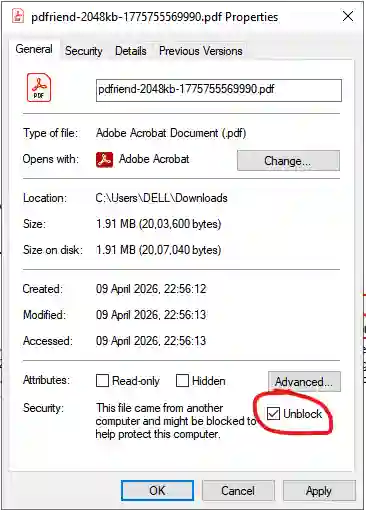
Why does Windows Preview say the file 'could harm your computer'?
This is a Windows security feature for files downloaded from the internet. Since you generated this PDF safely in your browser, you can trust it. To fix the preview, follow these steps:
- Right-click the downloaded PDF and select Properties.
- In the General tab, check the Unblock box at the bottom.
- Click Apply and then OK.
Need a different size? Our compressor is flexible—just use the quality slider to reach your exact target.

Security Note: This tool was built to solve the privacy risks associated with document forgery. As a Computer Science professional, I have audited this tool to ensure it processes data 100% offline. Your files never touch our servers.
User Feedback
Reviews for this tool
0 TotalActivity on other tools
Real-timeMore PDF Tools
Other Popular Tools
EMI Calculator
Calculate your monthly EMI for Home, Car, and Personal loans instantly. View principal vs interest breakdown.
Pro Resume Builder
Build ATS-friendly professional resumes without monthly subscriptions. High-end templates and instant PDF export.
Secure Password Generator
Create strong, secure random passwords instantly. 100% private client-side generation using CSPRNG. No data leaves your browser.
Remove PDF Metadata
Scrub hidden data like Author, Creator, and Date from your PDFs for ultimate privacy and clean professional files.